
A quick run through on route summarization with BGP.
Resources:
Video: Routing & Switching – BGP | Lab Minutes

AGGREGATION
The CIDR Report: See what a difference aggregation can make.
https://bgp.potaroo.net
What’s the difference between aggregation and summarization? It seems like we’re just doing summarization here!
According to TCP/IP, Volume II, they’re the same thing. They used to be slightly different, but not anymore. Apparently, the cool way to say it is “aggregate”. So don’t say “summary” unless you want everyone to laugh at you.
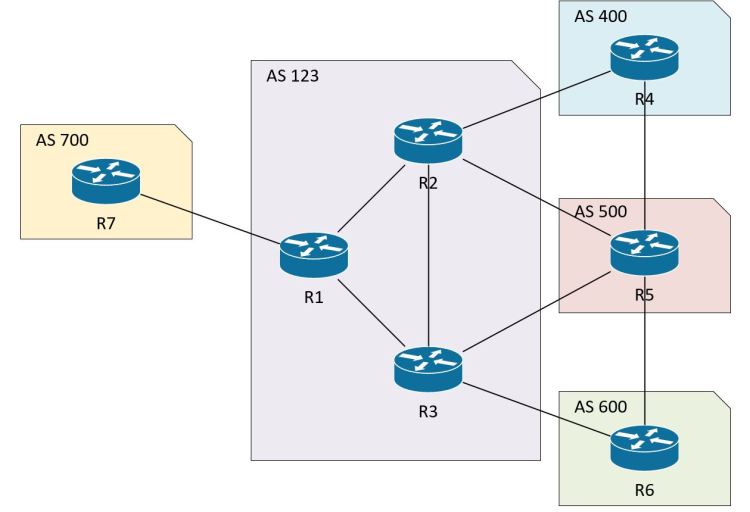
The trick with route summarization in BGP is that enabling summarization doesn’t stop the individual routes that are subsets of that summary from being advertised.
For example, if you summarize:
10.1.0.0/24
10.1.1.0/24
10.1.2.0/24
10.1.3.0/24
Summarized as:
10.1.0.0/22
You’ll end up advertising all 4 original routes, plus the summary route.
Let’s see it in action…
R1
router bgp 123
aggregate-address 10.1.0.0 255.255.252.0
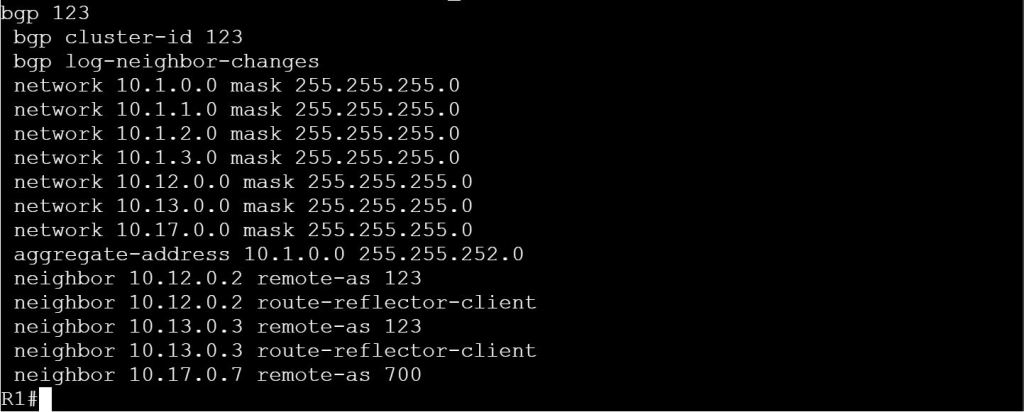
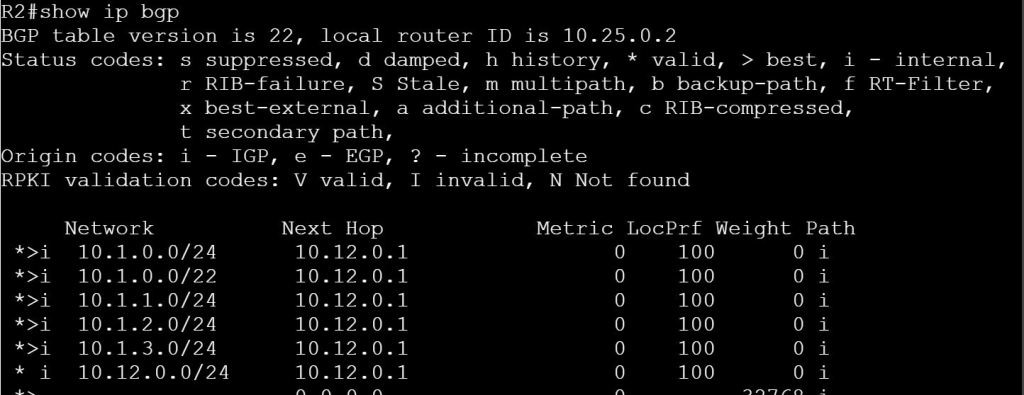
How do we deal with this nonsense!?
You can just use summary-only to advertise just that summary route.
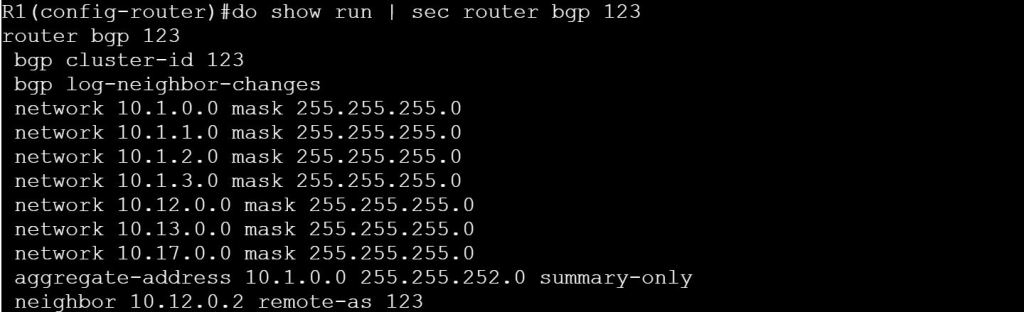
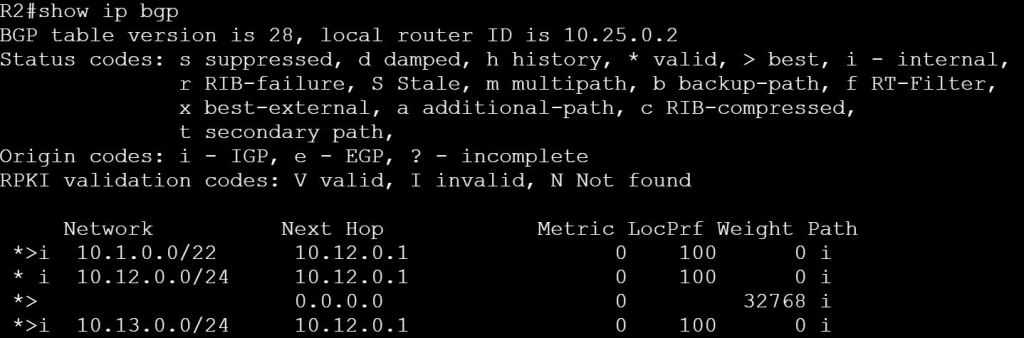
That seems simple enough. But you can’t pick and choose where you want to advertise the summary route vs. where you want to send the individual routes.
Let’s get rid of this summary-only command and switch to prefix lists, instead. Then we have more control.
Task 1: Send 10.1.0.0/22 summary route to R7. Send the individual routes to R2 and R3. Do not send the summary route to R2 and R3.
R1:
!Create a prefix-list that blocks the 10.1.0.0/22 routes with a
! subnet greater than or equal to /24
ip prefix-list SEND_SUMMARY deny 10.1.0.0/22 ge 24
ip prefix-list SEND_SUMMARY permit 0.0.0.0/0 le 32
!Create a prefix-list that blocks only the summary route.
! The individual routes get sent. Leaving off le or ge means an implicit =mask
ip prefix-list BLOCK_SUMMARY deny 10.1.0.0/22
ip prefix-list BLOCK_SUMMARY permit 0.0.0.0/0 le 32
router bgp 123
neighbor 10.17.0.7 prefix-list SEND_SUMMARY out
neighbor 10.12.0.2 prefix-list BLOCK_SUMMARY out
neighbor 10.13.0.3 prefix-list BLOCK_SUMMARY out
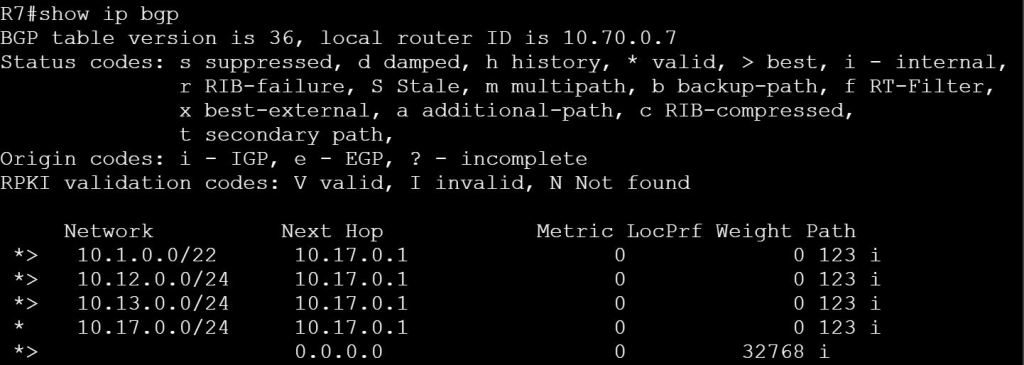


But wait! There’s more.
What if I want to keep things simple by using the summary-only command. But then I decide I also want to send the 10.1.2.0/24 to R7?
We can leak it with a route-map using the unsuppress-map command!
First thing, we clear out all the previous config on R1. Then we apply:
router bgp 123
aggregate-address 10.1.0.0 255.255.252.0 summary-only
Verify on R2 that we’re only getting the summary route:
show ip bgp
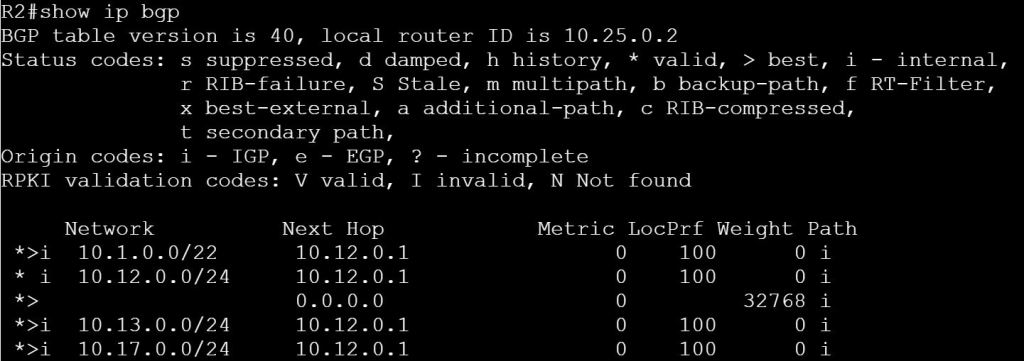
TASK 2: Summarize the 10.1.0.0/24 through 10.1.3.0/24 networks. Only send the summary route to R7 and R3. Send the summary route and route 10.1.2.0/24 to R2.
R1:
ip prefix-list PL_LEAK permit 10.1.2.0/24
!Create the route-map
route-map RM_LEAK
match ip address prefix PL_LEAK
router bgp 123
neighbor 10.12.0.2 unsuppress-map RM_LEAK
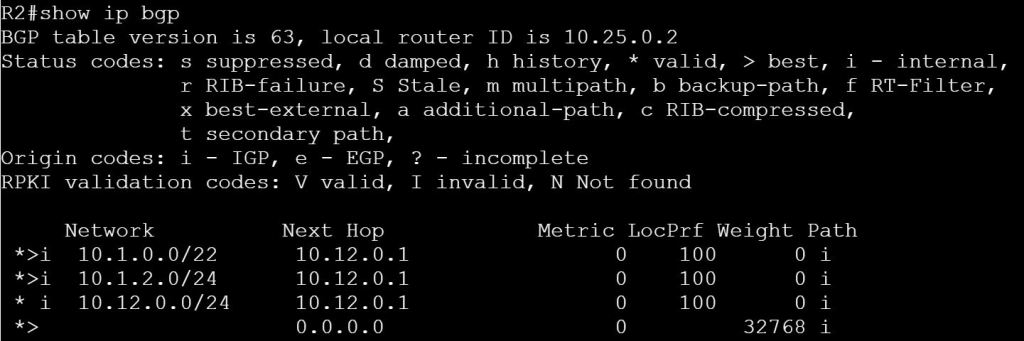
OK, so that’s great. But what about the suppress-map option under the aggregate-address command, what does that do?
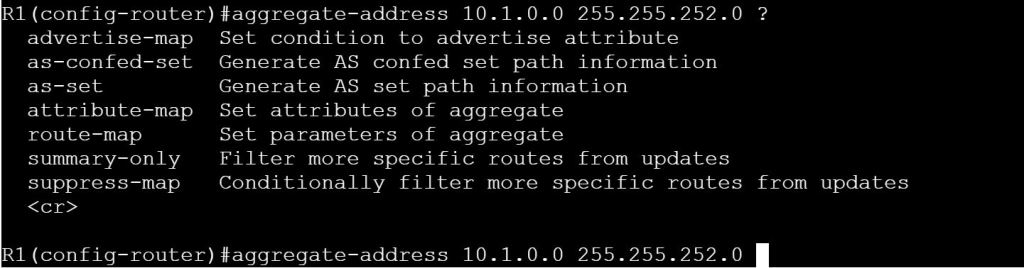
We can use suppress-map to send the summary, but also filter out some of the individual routes. This is similar to what we did with Task 2, but it affects all neighbors. Let’s try to suppress 10.1.0.0/24, 10.1.1.0/24, and 10.1.3.0/24. The end result should be that we’re advertising the summary route, 10.1.0.0/22, plus the 10.1.2.0/24 route only.
We have two options for the prefix-list:
First is to permit all of the routes that exist in the aggregate range that we want to suppress:
ip prefix-list PL_LEAK1 permit 10.1.0.0/24
ip prefix-list PL_LEAK1 permit 10.1.1.0/24
ip prefix-list PL_LEAK1 permit 10.1.3.0/24
(implicit deny at the end)
Second is to deny the one route that we want to leak, and permit everything else. This is one of those backward logic scenarios where permit and deny appear to be reversed. Permit means, “Which routes do we want to suppress, i.e. NOT advertise.”
ip prefix-list PL_LEAK1 deny 10.1.2.0/24
ip prefix-list PL_LEAK1 permit 0.0.0.0/0 le 32
route-map RM_LEAK1
match ip address prefix PL_LEAK1
router bgp 123
aggregate-address 10.1.0.0 255.255.252.0 supress-map RM_LEAK1
AS-SET
One of the shortcomings with aggregation is that we lose the AS-Path, which we know we need for loop prevention. Let’s take a look at some route aggregation for R7:
10.7.0.0/24
10.7.1.0/24
10.7.2.0/24
10.7.3.0/24
Aggregated as 10.7.0.0/22
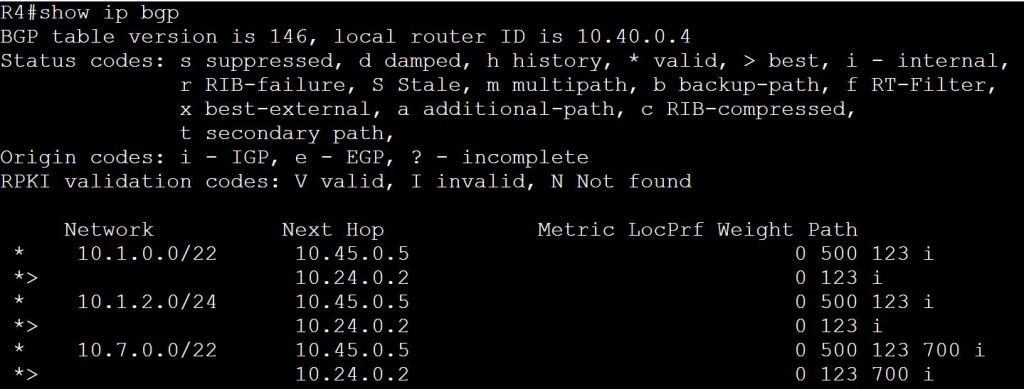
Let’s see what happens on R4 if we use aggregate-address on R7:
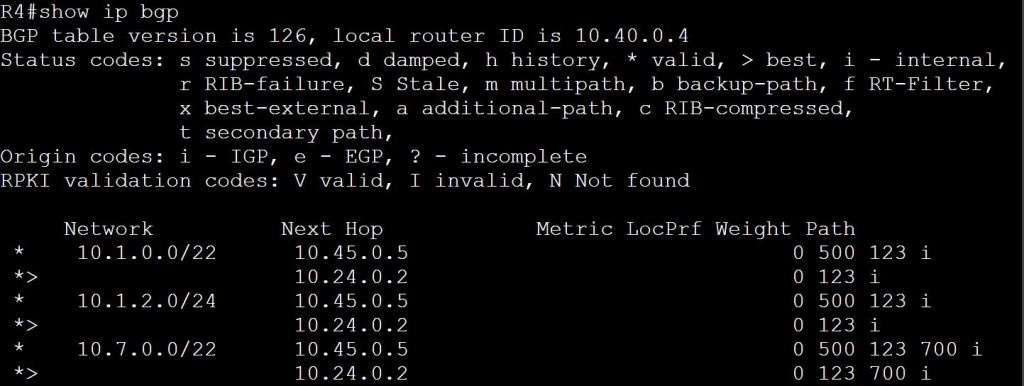
But what if R1 in AS 123 does the aggregation?

This looks like a recipe for a routing loop. Let’s see what R7 thinks about all of this:
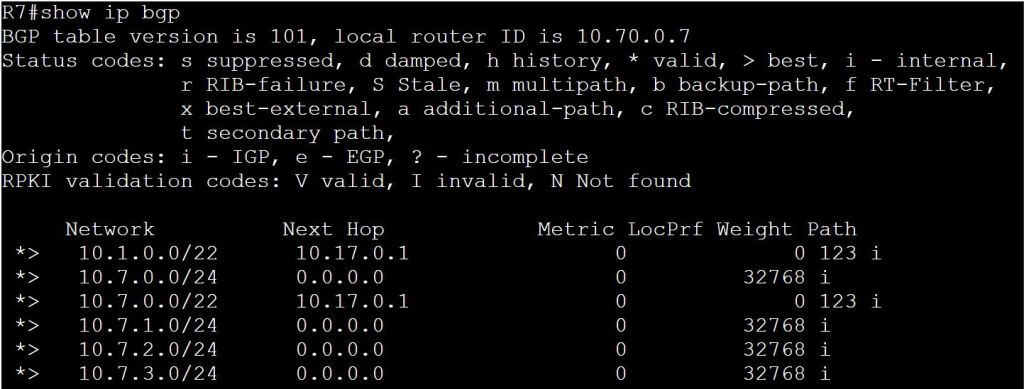
If 10.7.3.1 on R7 goes down, the traffic won’t actually loop, but R7 will try to send it to R1. R1, as the aggregator, will just drop it because it won’t have a more specific route.
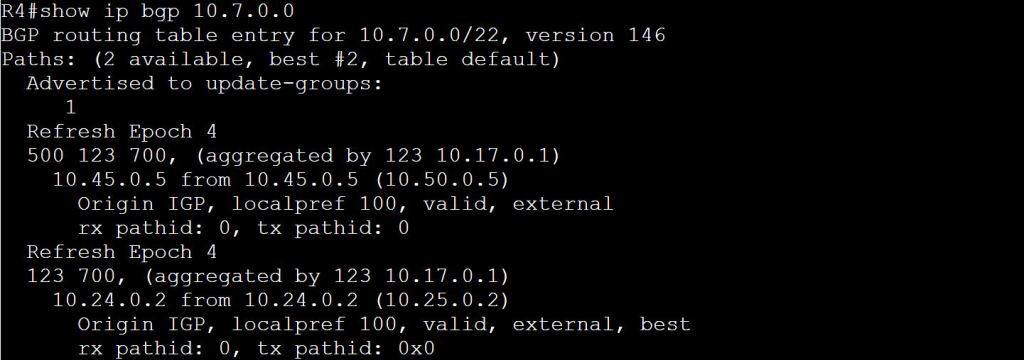
Is there any way for R4 to know this aggregation is happening?
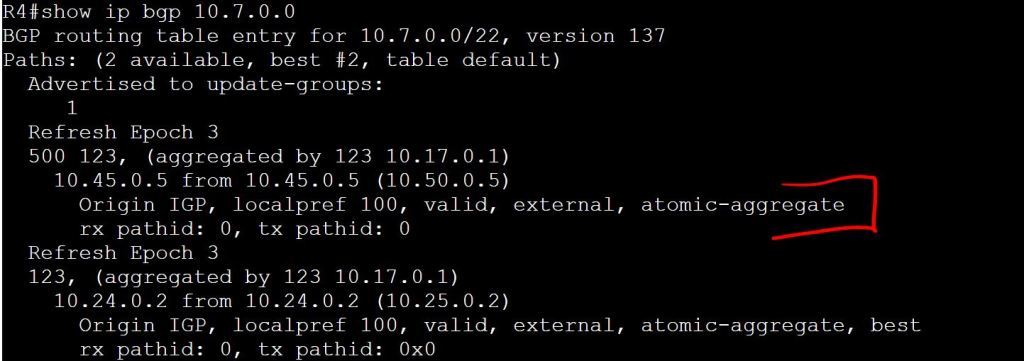
This brings us to the as-set command. This will tell the aggregator to include an unordered AS list. So in our case, R1 should include AS 700 in it’s path attributes.
R1:
router bgp 123
aggregate-address 10.7.0.0 255.255.252.0 summary-only as-set
 Oscorp Labs