
1.5.b i: Attributes
There are a million resources out there that will explain BGP attributes and path selection better than I can, but I’m doing this for my own purposes and will try to phrase it so I’m able to easily remember it when I come back to review. I recommend you skip this entry and check out the TCP/IP, Volume II book instead.
One thing to note that’s been making me insane regarding the amazing TCP/IP books. TCP/IP Volume 1 uses the number one, the digit. Then Volume 2 uses the Roman numeral II. The inconsistency makes me nuts. It’s like if Empire Strikes back was Episode V and Return of the Jedi was Episode 6.
So the first four are easy. Just do show ip bgp and they’re listed right there just not in order:
Weight, Local Preference, Originating Locally, AS Path, Origin Code, Metric (MED)
This order kind of makes sense.
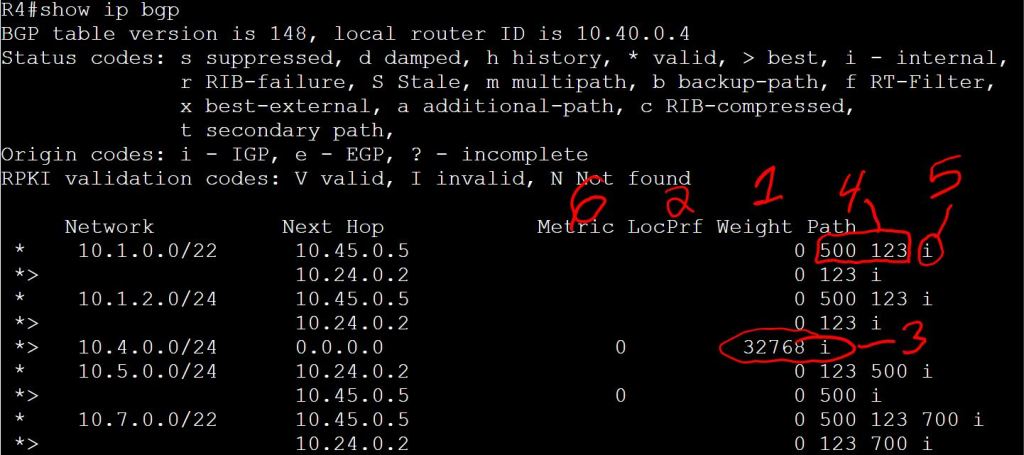
- Weight: It’s Cisco proprietary, so of course it’s better than everything else. Also, it’s locally significant only to the router where it’s configured and isn’t sent in updates, so you don’t have to worry about it not being accepted by non-Cisco neighbors.
- Default is 0.
- Higher is better.
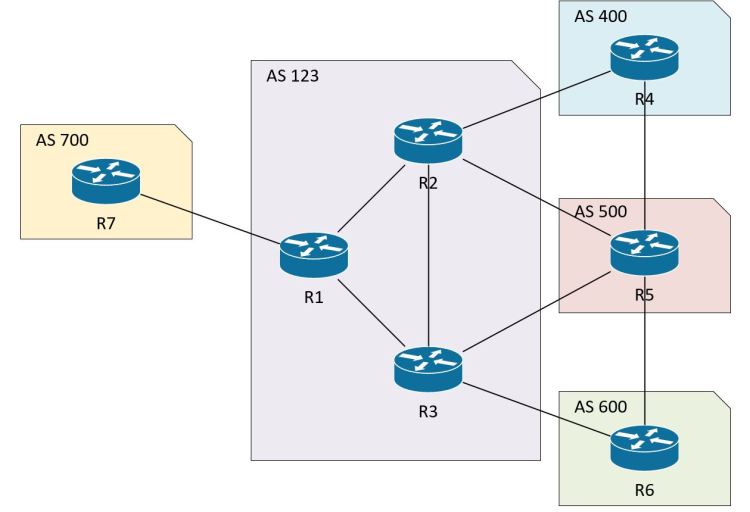
- Local Preference: This has to come second because it’s how you want to control routing in your local AS. If R2 and R3 are in AS 123 and are both directly connected to AS 500, you want to be able to decide which path your traffic takes. You can’t just use weight, because your iBGP neighbor, R1, that connects to R2 and R3 needs to know who is the preferred path. Set local preference higher on R2 for routes going to AS 500 and R2 will be sure to let R1 know, “I’m the guy, AS 500 likes me better. R3 sucks.”
- Default is 100, but if it’s blank that means 100.
- Higher is better.
- Originating Locally: This one is tough to spot in the picture. You have to look for what’s NOT there. There’s no AS_PATH listed. And I know I didn’t modify that weight manually, it must be a locally originated route. Locally originated just means it was added under the router bgp 123 section, with the network, aggregate-address, or redistribute commands. Again, it makes sense that this would be preferred over one with an AS_PATH. It’s configured locally, if we can’t trust that route, what can we trust?!
- AS_PATH: Shortest wins. “Who cares if it’s a 56k modem, it’s only one AS away! That 100Gig link is two AS paths away! I prefer the shorter path!”
- Origin Code: This is just the i at the end of the line: i beats e beats ?. (I means we used the network command. E isn’t used any more. ? means it’s redistributed into BGP)
- Metric (MED): This is the most confusing one. So far, everything else on the list was something that was happening locally. The MED is something we receive from a neighbor. The neighbor sends it with the BGP updates and says, “Hey, by the way, I’d prefer you send to me via R3.”
- Lower is better.
- Of course it has to be different. It can’t just be “higher is better” like everyone else.
The rest of the list sucks. It’s so long that it makes remembering those important ones at the top a lot harder. It’s just a bunch of tie-breaker nonsense. In short: eBGP over iBGP (quickest way out of the AS is the best), lowest IGP metrics, oldest route, lowest router-id, lowest ip address. Worry about these for written exams, but I can’t imagine them coming into play in the lab.
Configuring Path Selection
Local Preference
Let’s start with Local Preference. Super easy. Just a route-map:
R3:
route-map SET_LOCALPREF
set local-preference 150
router bgp 123
neighbor 10.35.0.5 route-map SET_LOCALPREF in
The trickiest thing to remember here is that we’re setting it locally in our AS, so we need to set it coming IN from the remote AS.
Below we see R3 has the LocPrf of 150 set for the paths from AS 500. But of course it does, we manually configured that value on R3. This isn’t where Local Preference shows its value.

Let’s look at R2 now. We didn’t configure any Local Preference on R2.

Since the Local Preference is now higher on R2, which path will R2 take to get to the directly connected neighbor R5 in AS 500? Ideally, we’d want to go direct via 10.25.0.5… let’s do a traceroute and see:

WEIGHT
We see that R2 is taking a less optimal path now, bouncing around inside AS 123 like a pinball before going out to AS 500. How can we fix that? We don’t want to remove Local Preference from R3, because we want everyone else in AS 123 to use R3 to get to AS 500. Do we know of a way to change just the local router’s path preference? Go ahead and think about it, I’ll weight.
R2:
route-map SET_WEIGHT
set weight 25
router bgp 123
neighbor 10.25.0.5 route-map SET_WEIGHT in
Again, we’re setting up how we want to handle traffic that we learned from AS 500. In fact, it’s internally significant information, we set the weight as the insightful information is coming IN.

Let’s do another traceroute.

AS-PATH
AS-Path is cool because it affects both inbound and outbound path selection, whereas Local Preference and Weight only affect outbound (the path you want to take to leave your AS) and MED only affects inbound (the path you want your neighbor to take to get to you). But it can also be tricky and dangerous. Changes to AS-Path will get propagated beyond just your local AS and your directly connected neighbors.
The config is pretty simple. The only trick is that you configure it on the router that you don’t want to be your primary router. If we want R2 to be the preferred path, we’ll configure R3 to add more AS-Paths.
R3:
route-map SET_ASPATH_IN
set as-path prepend 500 500
router bgp 123
neighbor 10.35.0.5 route-map SET_ASPATH_IN in
Just like Weight and Local Preference, we’re setting it inbound from the neighbor AS 500 because we want to affect how our local AS sends traffic out to AS 500. Typical backwards logic.

But let’s check R5’s perspective. Since we set the as-path prepend inbound from AS 500, notice the 10.3.0.0 network still shows a single AS 123.
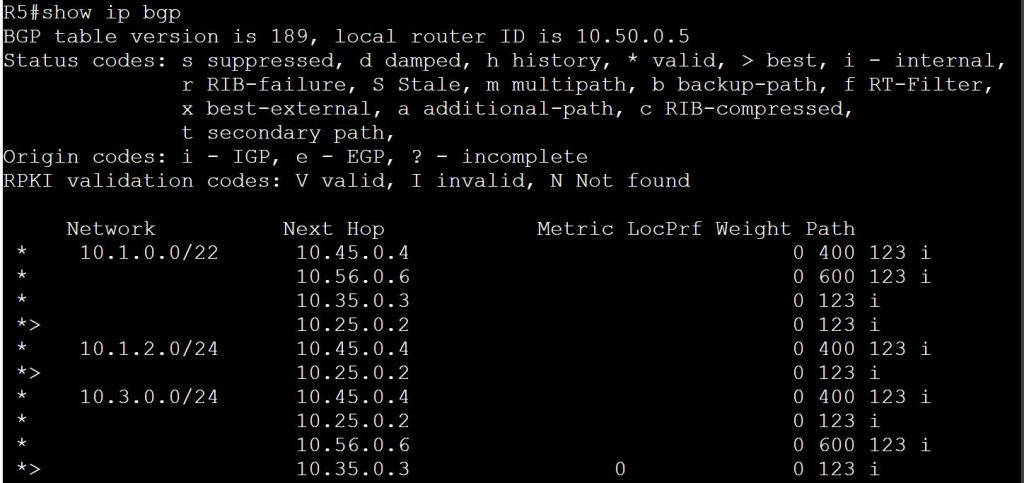
Let’s set the route-map going out to 10.35.0.5 and see what happens.
R3:
route-map SET_ASPATH_OUT
set as-path prepend 123 123 123
router bgp 123
neighbor 10.35.0.5 route-map SET_ASPATH_OUT out

So that’s more like it. Notice that we see three sets of AS 123, even though we only prepended two sets in the route map. It’s because there’s the regular AS_PATH attribute that comes with the route advertisement, plus the two prepended ones.
If we didn’t set inbound and outbound AS_Path prepending, we could end up with asymmetric routing.
Metric (MED)
We’re going to use MED to tell our neighbor which route we want them to use to get to our AS. Since MED is pretty far down the list, it’ll only work if the neighbor hasn’t already modified their Local Preference or Weight (or AS_Path). You can use MED in conjunction with Local Preference to avoid asymmetric routing.
- Lower is better.
- Default value is zero. So by default, all MEDs are at the max value of zero.
- Since you want to affect routes coming INTO your AS, you need to apply it OUT to your neighbor. Again, more backwards logic.
- Like AS_Path, you can’t make yourself any better, so you need to sabotage the other routers to make them worse. Real classy…
R2:
route-map SET_MED
set metric 37
router bgp 123
neighbor 10.25.0.5 route-map SET_MED out
Again, we’re sending the modified update OUT to R5 so that he can apply it to traffic coming into our AS. I’m starting to detect a pattern with these configs…
 Oscorp Labs