
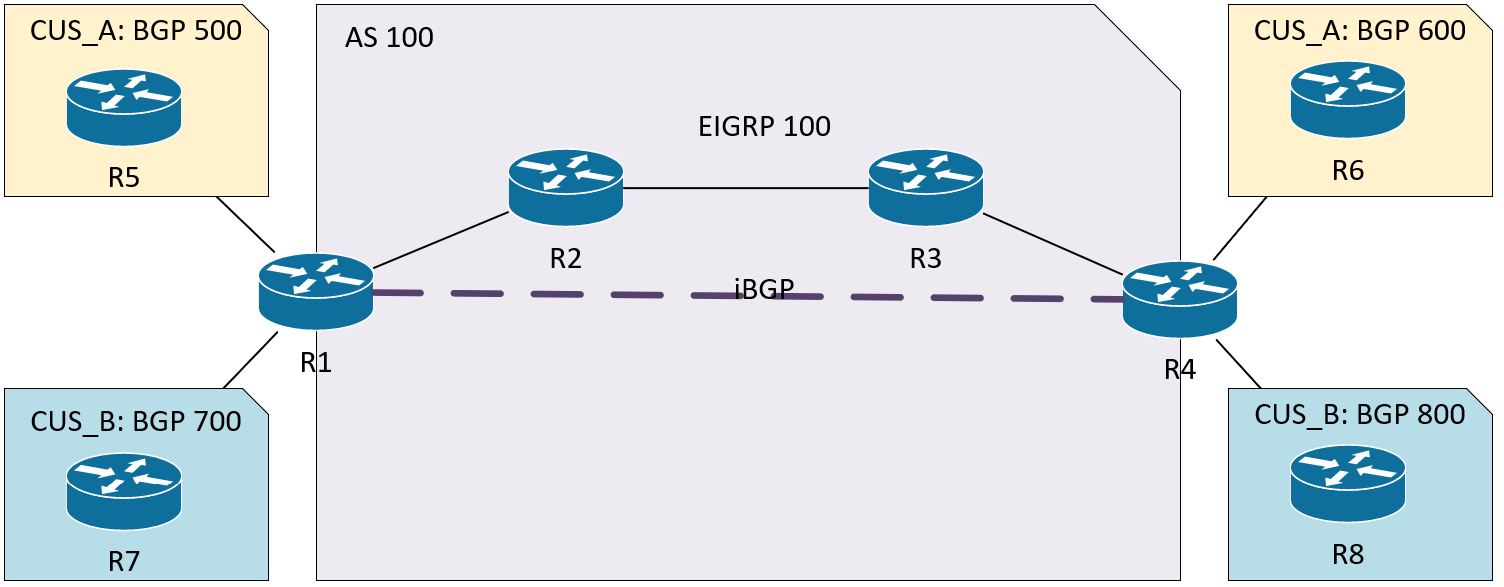
Since I covered VPNv4 pretty thoroughly in the previous post (3.1.b i), I’m going to stick to just VPNv6 here.
You basically have two options: tunnel your IPv6 traffic from your CE routers using something like GRE, or use IPv6 + Label on the PE routers. For this labbing exercise, I’m going to focus on the IPv6 + Label option. IPv6 + Label has two flavors, 6PE and 6VPE. The big difference is that 6VPE is carrying IPv6 prefixes across a VPN, completely separate from other customers using the same MPLS network.
6PE Overview
- The PEs are running dual stack. The P routers don’t even need to support IPv6, which is cool.
- No VPNs for IPv6, which means no VRFs for IPv6 on the PE routers. It’ll all be in the global routing table.
- The same interface can be used for IPv4 with VRFs and IPv6.
- A second MPLS label will be used for IPv6 prefixes. This is required, otherwise the penultimate router would need to understand IPv6 when it pops the label before sending to the egress LSR.
6PE Configuration
Super easy, we just add the send-label command.
R1:
router bgp 100
address-family ipv6
neighbor 10.4.4.4 activate
neighbor 10.4.4.4 send-label
6VPE Overview
- Pretty similar to 6PE and MPLS VPN IPv4.
- P routers still don’t need to know anything about IPv6.
- PE routers must be IPv6 capable.
- Interfaces facing CE routers have VRFs for IPv6 (and IPv4, if needed).
- MP-BGP (or MP-iBGP, if you prefer that name) full mesh between PE routers and distributes the IPv6 VPN prefix-to-label mapping. Pretty much the same as IPv4. Now it’s called “vpnv6 + label”.
- It is still a two label stack. MPLS/IGP is the top label, BGP label is the bottom label.
- IPv6 between CE and PE routers.
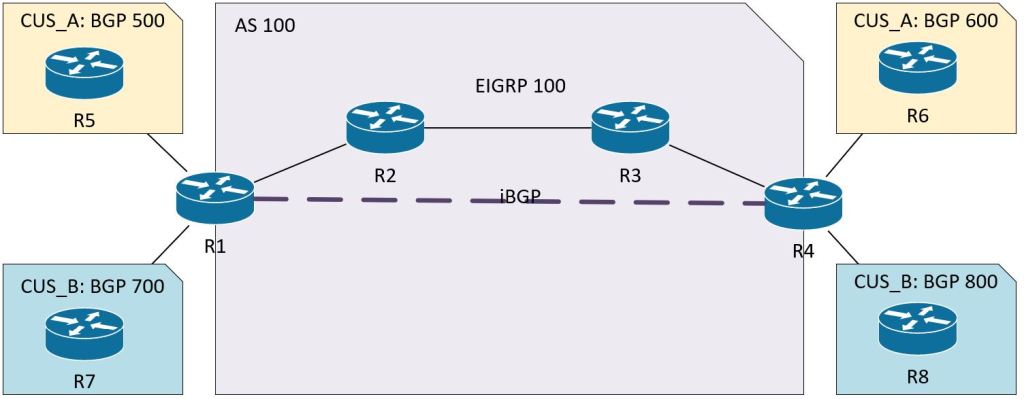
6VPE CONFIGURATION
There are a couple things I want to note here.
- I’m just putting the configs for the left side of the diagram so this post isn’t a mile long. The right side can just be copied and pasted in notepad with the IPs changed.
- I didn’t include the MPLS config because it’s the same as previous posts. Just enable it on the P and PE router interfaces.
- I thought this was going to be a super simple config that I banged out in 20 minutes, but I ended up spending 4 hours on it last night trying to get it working. I didn’t follow the simple rule, “Configure things in small chunks and make sure the first chunk works before moving onto the next chunk.” I screwed up the basic EIGRP config and that cascaded to end-to-end failure. I spent the whole time chasing BGP ghosts. If this were the lab, I would’ve burned 4 hours on a 30-minute task.
R1:
vrf definition CUS_A
rd 100:500
address-family ipv6
route-target import 100:65
route-target export 100:56
! I’m using different numbers for the RT values to show how they’re related on R4. R4 will use the opposites, “import 100:56, export 100:65”
vrf definition CUS_B
rd 100:700
address-family ipv6
route-target import 100:87
route-target export 100:78
inter gig 0/0
vrf forwarding CUS_A
ipv6 address 2001:A:5::2/64
inter gig 0/2
vrf forwarding CUS_B
ipv6 address 2001:B:7::2/64
interface Loopback 0
ip add 10.1.1.1 255.255.255.255
! Important thing to note. When I was labbing this, I just couldn’t get it to work. I spent an hour triple checking my BGP config. Turned out to be the loopback 0 interfaces were not reachable between MPLS peers. I had forgotten to advertise them with EIGRP. show mpls forwarding-table was showing everything as No Label.
mpls ldp router-id loopback 0
int gig 0/1
ip address 10.12.0.1 255.255.255.0
mpls ip
! Again, we have to make sure the MPLS P routers can communicate from loopback to loopback.
router eigrp 100
network 10.1.1.1 0.0.0.0
network 10.12.0.0 0.0.0.255
router bgp 100
neighbor 10.4.4.4 remote-as 100
neighbor 10.4.4.4 update-source Loopback0
! We’ll explicitly disable the ipv4 address-family neighborship.
address-family ipv4
no neighbor 10.4.4.4 activate
! I find this to be confusing, but the VPNV6 is set up with the iBGP IPv4 addressing. But remember, the whole MPLS network is IPv4.
address-family vpnv6
neighbor 10.4.4.4 activate
neighbor 10.4.4.4 send-community extended
address-family ipv6 vrf CUS_A
redistribute connected
neighbor 2001:A:5::1 remote-as 500
neighbor 2001:A:5::1 activate
neighbor 2001:A:5::1 send-community both
address-family ipv6 vrf CUS_B
redistribute connected
neighbor 2001:B:7::1 remote-as 700
neighbor 2001:B:7::1 activate
neighbor 2001:B:7::1 send-community both
R5:
router bgp 500
bgp router-id 10.5.5.5
no bgp default ipv4-unicast
neighbor 2001:A:5::2 remote-as 100
address-family ipv6
network 2001:A:105::/64
neighbor 2001:A:5::2 activate
R7:
router bgp 700
bgp router-id 10.7.7.7
no bgp default ipv4-unicast
neighbor 2001:B:7::2 remote-as 100
address-family ipv6
network 2001:B:107::/64
neighbor 2001:B:7::2 activate
 Oscorp Labs