
I’m getting beat up pretty bad by SD-WAN, so I’m taking a break to bang out some easy stuff off the blueprint. I want to give myself a false sense of progress.
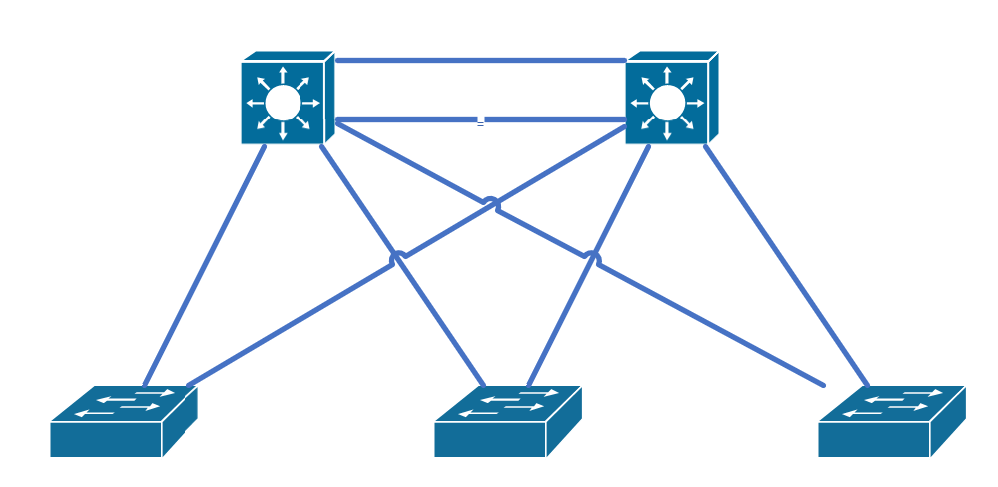
The topology is super simple:
1.1.e i PVST+, Rapid PVST+, MST
Super-quick summary on the versions:
PVST+: 30-50 seconds before a port transitions to FWD. 50 VLANs means 50 BPDUs.
Rapid-PVST+: Convergence can happen in less than a second. But you can still have scenarios that are up to 6 seconds (2 seconds between BPDUs times 3 missed BPDUs to trigger re-convergence). Also, 50 VLANs still means 50 BPDUs.
MST: MST allows you to group VLANS to cut down on the number of BPDUs. The timers are the same as Rapid-PVST+.
One more thing about MST: the name, revision number, and digest of the 4096-element VLAN table have to match between peers.
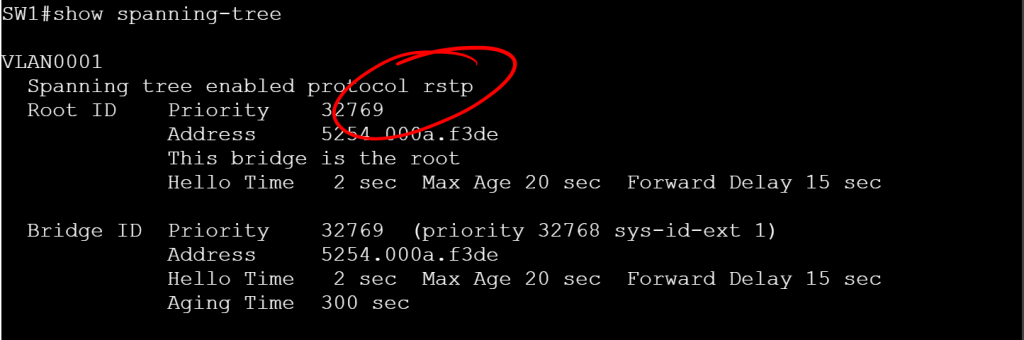
Let’s check the current mode:
show spanning-tree

IEEE means PVST+
RSTP means Rapid-PVST+
MSTP means MST
It’s worth calling out the MST config, because it’s a little different. You go under MST configuration mode, set the name, the revision number, and the vlans for the instance.
spanning-tree mode mst
spanning-tree mst configuration
name MY_MST_CONFIG
revision 1
instance 1 vlan 10,20
instance 2 vlan 30,40
1.1.e ii Switch priority, port priority, path cost, STP timers
Since we’re working with per-VLAN STP by default, let’s take 4 VLANs (10, 20, 30, and 40) and make SW1 the root for VLANs 10 and 20, then make SW2 the root for VLANs 30 and 40.
SW1
spanning-tree vlan 10,20 priority 4096
spanning-tree vlan 30,40 priority 8192
SW2
spanning-tree vlan 10,20 priority 8192
spanning-tree vlan 30,40 priority 4096
But there’s an easier way where we don’t have to figure out multiples of 4096. Just use the root primary command.
SW1
spanning-tree vlan 10 root primary
spanning-tree vlan 20 root primary
(optionally, we can specify this switch as the secondary root for vlans 30 and 40.)
spanning-tree vlan 30 root secondary
spanning-tree vlan 40 root secondary
SW2
spanning-tree vlan 10 root secondary
spanning-tree vlan 20 root secondary
spanning-tree vlan 30 root primary
spanning-tree vlan 40 root primary


But this 30-50 second timer takes too long. Let’s flip the mode to Rapid-PVST+ so we can have two second timers.
spanning-tree mode rapid-pvst
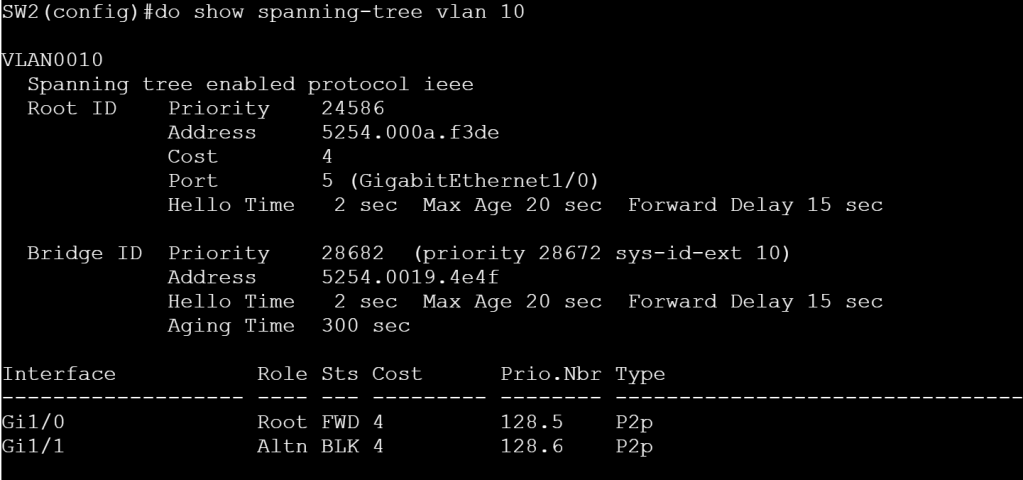
Right now on SW2 for VLAN 10, Gig1/0 is forwarding and Gig1/1 is blocking. Let’s flip flop those using some interface level STP config. (Note, this isn’t Rapid-PVST specific, I just don’t want to wait a minute after making the change.)
SW2
interface gig 1/1
spanning-tree cost 1
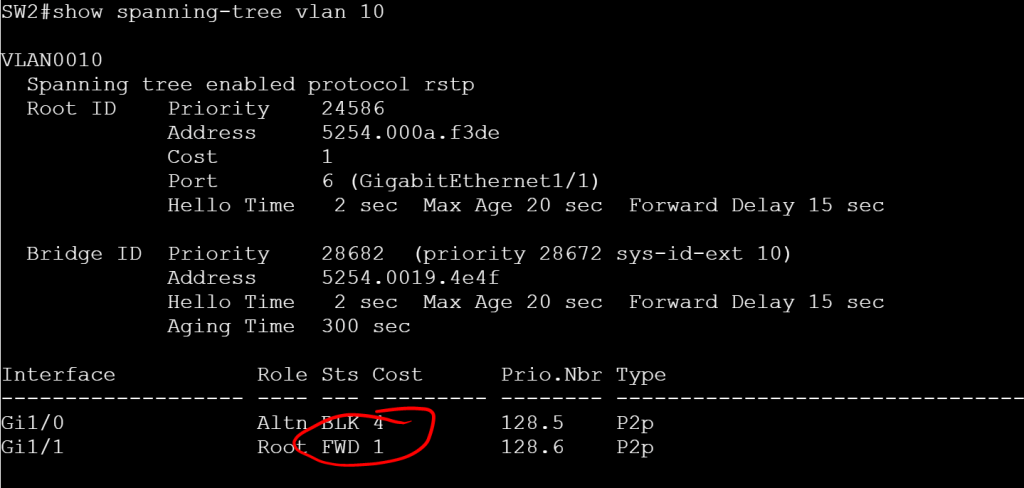
A note about Path Cost, these numbers get added up along the way and then tacked onto the Priority number, which gives the total priority. We’re using Short Path Cost Method, where 1Gig interface default cost is 4 and a 10 Gig interface default cost is 2. With Long Path Cost Method, those numbers are 20,000 and 2,000, respectively. The method can be modified as follows:
spanning-tree pathcost method long
(Also, switching to MST mode automatically sets it to Long).
One last thing to configure for this sub-section. Let’s modify the timers.
Hello Timer (default is 2, range is 1-10):
spanning-tree vlan 10 hello-time 1
Forward-Delay Timer (default 15, range is 4-30):
spanning-tree vlan 10 forward-time 7
Maximum-Age Timer (default is 20, range is 6-40):
spanning-tree vlan 10 max-age 8
1.1.e iii PortFast, BPDU Guard, BPDU Filter
Let’s throw PortFast on the access ports (just don’t plug a switch into this interface):
interface gig 1/0/13
switchport mode access
switchport access vlan 10
spanning-tree portfast edge
If someone does try to plug a switch into our access port, we should have BPDU Guard enabled to shut the port down:
interface gig 1/0/13
switchport bpduguard enable
But maybe we don’t want to err-disable ports that get BPDUs, maybe we just want to ignore BPDUs. And for good measure, we’ll not send BPDUs either. This can be dangerous if enabled on a single interface, since it basically disables STP. Instead, let’s just enable it globally, then it only gets enabled on PORTFAST ports.
spanning-tree portfast edge bpdufilter default
1.1.e iv Loop Guard, Root Guard
Loopguard is primarily used to prevent half of a link going down and causing a loop because BPDUs are still received from one side, but not the other. The real trick to it is figuring out which interfaces it should be applied to. Basically you’ll want to put it on Root, Alternate, and Backup ports (not on Desg ports). You can apply it globally or per interface:
spanning-tree loopguard default
or
interface gig 1/0/1
spanning-tree guard loop
Rootguard is the opposite, you only apply it to Desg ports. RootGuard prevents a rogue switch with a lower priority from becoming root.
interface gig 1/0/24
spanning-tree guard root
 Oscorp Labs