
BFD is a critical, CRITICAL, component of SDA and SD-WAN. So it’s worth taking a deep look at it here.
The process flow is:
1. The routing protocol, OSPF for instance, discovers a neighbor.
2. The routing protocol tells the BFD process to start a BFD peering relationship with that same neighbor.
3. If a failure occurs, BFD tells the routing protocol process that the link failed.
4. The routing protocol process tears down the neighborship right away.
Judging by the sequence, we should be able to figure out that the BFD config will live underneath each respective routing protocol config section. So it makes sense to break this out into routing protocol sections. There are a couple factoids worth calling out:
- If we’re running BFD in echo mode we need to disable icmp redirects to avoid high CPU utilization.
- no ip icmp redirects
- BFD is mostly data plane, so it’s you don’t have CPU overhead that you get with super-low timers on routing protocols.
- A single BFD process can notify multiple routing protocols. For instance, if you have OSPF and EIGRP running on the same link, you just need one BFD process.
The configuration is pretty easy. There are two options, enable it with the bfd interval command on each interface, or create a template and apply the template to each interface. We’ll do both methods, a template on R3 and manual on R4. We’ll set to the minimum transmit and receive to 100 milliseconds each, and set it to three strikes and you’re out. That should give use a total of 300 millisecond failure detection.
R3
conf t
bfd-template single-hop BFD_1
interval min-tx 100 min-rx 100 multiplier 3
!But wait, since we’re using 100 milliseconds for both, let’s use the both keyword instead.
interval both 100 multiplier 3
interface gig 0/0
bfd template BFD_1
R4
conf t
interface gig 0/0
bfd interval 100 min-rx 100 multiplier 3
Pretty simple, but we don’t have bfd echo enabled. We can verify that with show bfd neighbors details.
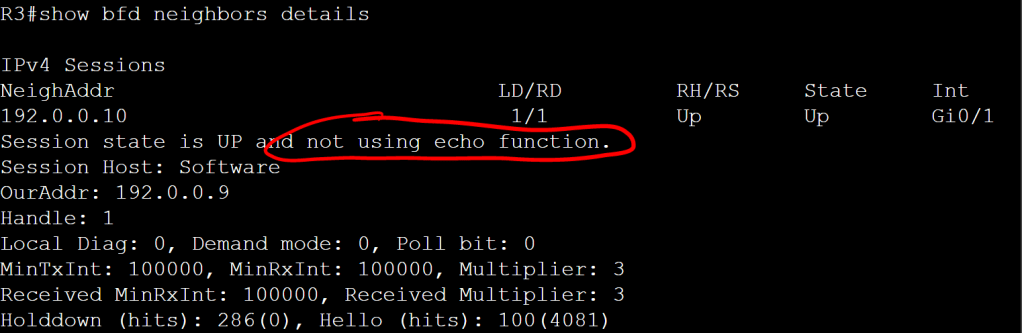
It’s important to note that it’s the neighbor that doesn’t have echo enabled. Let’s enable it on both sides.
R3
conf t
bfd-template single-hop BFD_1
echo
R4
conf t
interface gig 0/0
bfd echo
This change highlights the benefits of templates. If we’re doing the config on 10 interfaces, we’ll need to go into each interface and add the bfd echo command. But if we are using a template, we just update the template, and it applies to all interfaces where that template is in use.
OK, so we have our BFD neighborship up, but at this point it’s not actually doing anything for us because we didn’t tie it in to any routing protocols. So let’s do that real quick, super easy, one command.
OSPF
- OSPF tells BFD to start once the neighborship transitions to FULL.
- OSPF will only set up BFD peering session with the DR and the BDR on a network link.
R3 and R4
conf t
router ospf 1
bfd all-interfaces
EIGRP
The EIGRP config for BFD is almost identical to OSPF.
R3 and R4
conf t
router eigrp 100
bfd all-interfaces
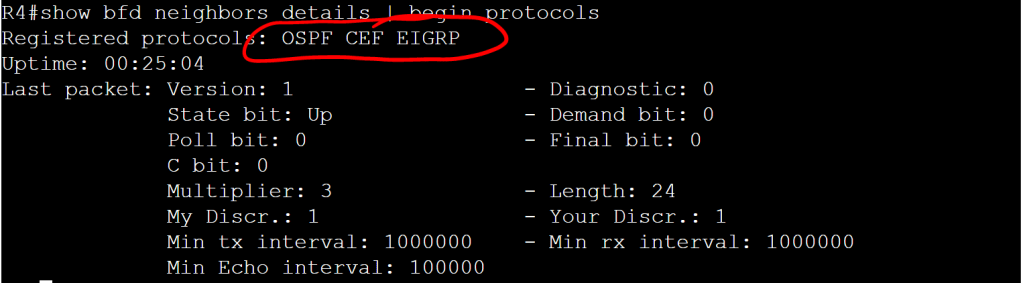
Let’s check it out with the show bfd neighbors details command.
BGP
The config for BGP is a tiny bit different. It’s set with the neighbor x.x.x.x fall-over bfd command. And yes, that says fall-over and not fail-over. As in “fall-over drunk”. I would think it should be fail-over, but what the hell do I know.
R3
conf t
router bgp 300
neighbor 192.0.0.10 remote-as 400
neighbor 192.0.0.10 fall-over bfd
R4
conf t
router bgp 400
neighbor 192.0.0.9 remote-as 300
neighbor 192.0.0.9 fall-over bfd
IS-IS
Even though IS-IS isn’t listed as a protocol we need to know for the Ent. Inf. exam, it is a core component of SDA, so we’re definitely going to come up against it at some point. The good thing is the BFD config is pretty similar to OSPF and EIGRP. It’s just the all-interfaces command under the router process.
R3
conf t
interface gig 0/1
ip router isis
router isis
net 49.0000.0000.0003.00
bfd all-interfaces
R4
conf t
interface gig 0/0
ip router isis
router isis
net 49.0000.0000.0004.00
bfd-all interfaces
HSRP
The cool thing about HSRP is that BFD is enabled by default, you don’t need the specific standy bfd or standy bfd all-interfaces commands. You just need the regular per-interface bfd command.
 Oscorp Labs