
Updated 11/5/23 to include unicast vs multicast neighbors and the no next-hop-self command.
The nice thing about Named Mode is everything is (sort of) in the same place, instead of some config being under router eigrp and some config being under individual interface configs. Is that it, it’s just more organized? There are also these advantages:
- IPv6 support.
- VRF support.
- Wide Metrics (discussed in a previous post) to support links bigger than 2Gig.
- Configurations are centralized, instead of some being under the router eigrp section, and some being under the interface config.
Let’s break named mode down into three sections.
- address-family: Network commands, neighbor commands (for unicast neighbors).
- address-family-interface: These commands used to live under individual interfaces and usually only affect one neighbor. This includes things like authentication, summary-addresses, passive-interface, and hello timers.
- address-family topology: This is where we do our redistribution, distribute-lists, and variance commands.
For the sake of having fun, let’s reconfigure R20 that we did for the summary-route and leak map section, but this time we’ll set a bunch of weird metrics for the summary route.
R20
router eigrp R20
address-family ipv4 autonomous-system 10
af-interface default
passive-interface
af-interface gig0/0
no passive-interface
summary-address 10.10.104.0/22 leak-map LEAKMAP
af-interface gig 0/1
no passive-interface
summary-address 10.10.104.0/22
exit
topology base
summary-metric 10.10.104.0/22 999999 479 249 29 1399 distance 169
variance 2
exit
network 5.5.10.0 0.0.0.255
network 5.5.80.0 0.0.0.255
network 10.10.104.0 0.0.0.255
network 10.10.105.0 0.0.0.255
network 10.10.106.0 0.0.0.255
network 10.10.107.0 0.0.0.255
We can view these modified metrics on the neighbor R21.

Compared with the direct route learned because of our leak-map.

1.2.e VRF-aware routing with any routing protocol
VRF config for EIGRP is done under named mode. It’s pretty straightforward.
R17
vrf definition 1
address-family ipv4 unicast
vrf definition 2
address-family ipv4 unicast
interface gig 0/0
vrf forwarding 1
ip add 5.5.78.17 255.255.255.0
interface gig 0/1
vrf forwarding 2
ip add 5.5.27.17 255.255.255.0
(obviously we’d need at least two interfaces or subinterfaces in each VRF, or we’re a bit of a dead end. But for the sake of brevity, I’m just showing one here.)
router eigrp R17
address-family ipv4 vrf 1 auto 10
network 5.5.78.0 0.0.0.255
address-family ipv4 vrf 2 auto 10
network 5.5.27.0 0.0.0.255
Notice we’re using the same AS for both VRFs. There’s no rule saying we can’t. And to test it we can do a traceroute from one interface to the other interface on the same router.

Unicast Neighbors vs Multicast Neighbors
With traditional EIGRP config, neighborships were formed using multicast on 224.0.0.10. With named mode you have the option of setting up unicast neighbors. This is a per-interface config, so you can have one neighbor using multicast on Gig0/1, and other neighbors still using multicast on Gig0/2 and Gig0/3. One thing to note, when you enable a unicast neighbor, that interface no longer accepts 224.0.0.10 EIGRP multicast packets. So the neighborship goes down until you configure both sides.
router eigrp E100
address-family ipv4 autonomous-system 100
neighbor 10.1.1.2 Gig 1
No Next-Hop-Self
This one is weird enough to show up on the lab exam. On the following diagram, all three routers’ Gig1 interfaces are in the same subnet, 10.1.1.0/24. R1 and R2 are EIGRP neighbors. R2 and R3 are OSPF neighbors. R2 is redistributing OSPF into EIGRP.
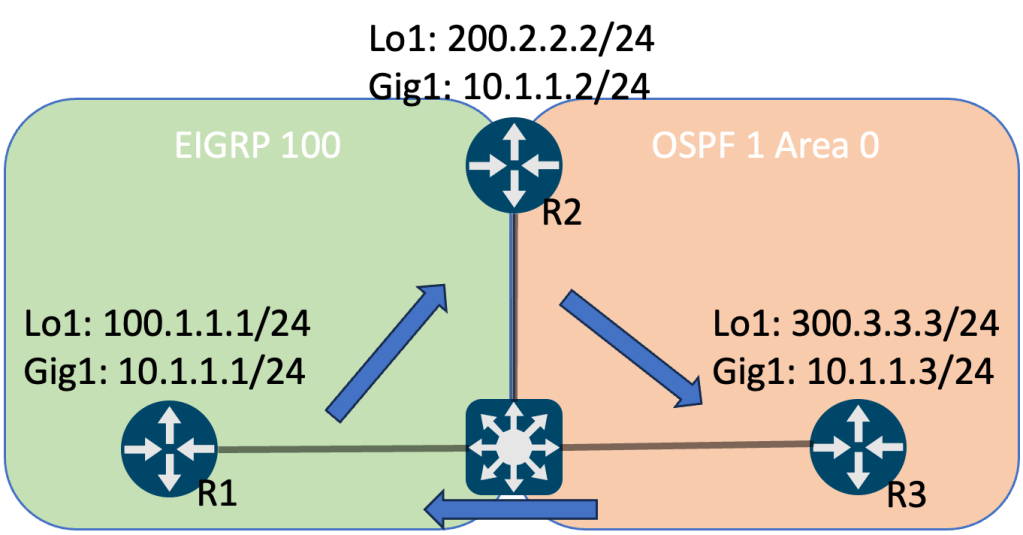
The result is when R1 tries to ping 300.3.3.3, the traffic flows to R2 first, then to R3, then directly back to R1. A more optimal path would be if R1 and R3 communicated directly. This is where no next-hop-self comes into play. Turning off next-hop-self prevents R2 from setting itself as the next hop for EIGRP routes it is advertising. This assumes that if they’re in the same subnet, they can reach each other.
R2
router eigrp E100
add ipv4 au 100
topology base
redistribute ospf 1 metric 100 1 255 1 1500
af-interface Gig1
no next-hop-self
 Oscorp Labs