
1.4.e i Metrics
I already covered OSPF metrics in the previous post, so I’ll skip it here. I may come back and move things around later to make it easier to find stuff.
1.4.e ii LSA throttling, SPF tuning, fast hello
LSA Throttling (OSPFv2)
LSA throttling does two things. Firstly, it’s gets us away from the 5-second rate-limit for LSAs, so we can get millisecond convergence. Second, it has a dynamic feature to slow things down when network instability is detected. The two commands are easy, but the timers and what each timer does can be a little confusing.
R1
router ospf 1
timers throttle lsa all [start interval] [hold interval] [max interval]
So what do these timers do?
- Start Interval means how long do we wait before we send the second LSA of the same type. The first LSA is sent immediately, but since we’re not waiting 5 full seconds to send the second one, we need to know when to send that next one. We’ll set it to 200 milliseconds.
- Hold Interval is the minimum time we’ll wait before sending two consecutive LSAs that are the same, meaning same Router ID, same LSA Type, and same LSA ID. Let’s set this to 500 milliseconds. The trick here is this time will keep doubling. So if our router’s links are unstable, the first LSA will go out immediately, the second one goes at 200 milliseconds (Start Interval), the third one goes out at the 700 millisecond mark (Start Interval + Hold Interval), the fourth one will go out at the 1700 millisecond mark (Start + Hold + (Hold x 2)
- Max Interval is the longest we’re willing to wait before re-sending an LSA. We can set that to 2000 milliseconds. This means as our Hold Interval keeps doubling, at some point we want to make it stay at a max value.
Now we need to jump over to the neighbor router and tell it how often it should expect LSAs. This number needs to be equal to or less than the hold interval of the neighbor. This value basically says, “If you send me repeat LSAs faster than this time then I’m just going to drop them.” If R1 is sending LSAs every 500 milliseconds, but R2 isn’t willing to accept them any faster than 1 per second, then we’re wasting a lot of R1’s time and resources.
R2
router ospf 1
timers lsa arrival 500
SPF Throttling (OSPFv2)
SPF throttling is pretty similar to LSA throttling, except the start interval means “how long to wait before running the first SPF calculation.” The idea is if things are flapping, you just keep extending the hold-time until you reach the max-timer, then just running it only when that timer exceeds until things stabilize.
R1
router ospf 1
timers throttling spf 5 500 10000
LSA and SPF Throttling for OSPFv3:
Pretty much the same for v2 and v3, but v3 has its own dedicated config page.
Bonus, non-blueprint item: LSA Flooding
If we recall, LSAs are grouped up and sent out every thirty minutes on a stable, converged network. But we can modify those timers as well.
R1:
router ospfv3 1
timers lsa arrival 1000 (same as v2)
timers pacing flood 100 (when to flood LSAs, in milliseconds)
timers pacing lsa-group 600 (this is seconds, it’s the interval at which we gather up our LSAs into a group, refresh them, checksum them, and age them.)
SPF Tuning
So what happens if we get a network change in our area, but we don’t want to do a whole big SPF recalculation? Isn’t there some way that we could just recalculate the bit that got change? Of course there is, it’s called Incremental SPF. Super easy config.
R1
router ospf 1
ispf
Fast Hello
Time for a commercial break. In honor of Fast Hellos, let’s enjoy Fast Goodbye.
Back to business. Here’s the reference link for Fast Hellos:
https://www.cisco.com/c/en/us/td/docs/ios-xml/ios/iproute_ospf/configuration/xe-16/iro-xe-16-book/iro-fast-hello.html
10 second hello packets? Are you kidding me? What year is this, 1987? Who has that kind of time!? Fast Hello basically means we can configure it to be less than 1 second. The concept is easy enough, but the configuration is a little counter-intuitive. You don’t actually set the Hello Timer. You just set the Dead Interval to 1 second, and set how many Hellos you want to send in that interval. The packets are actually sent with a hello timer of 0. Therefore, we can actually form a neighborship with different sub second timers, as long as the dead-interval matches at 1.
R1
interface gig 0/0
ip ospf dead-interval minimal hello-multiplier 4 (so we’re going to send a hello every quarter of a second.)
Verify it with show ip ospf interface gig 0/0.
1.4.e iii LSA propagation control (area types)
I covered this in the previous section, but one thing not called out on the blueprint is Virtual Links, so I’ll cover that here.
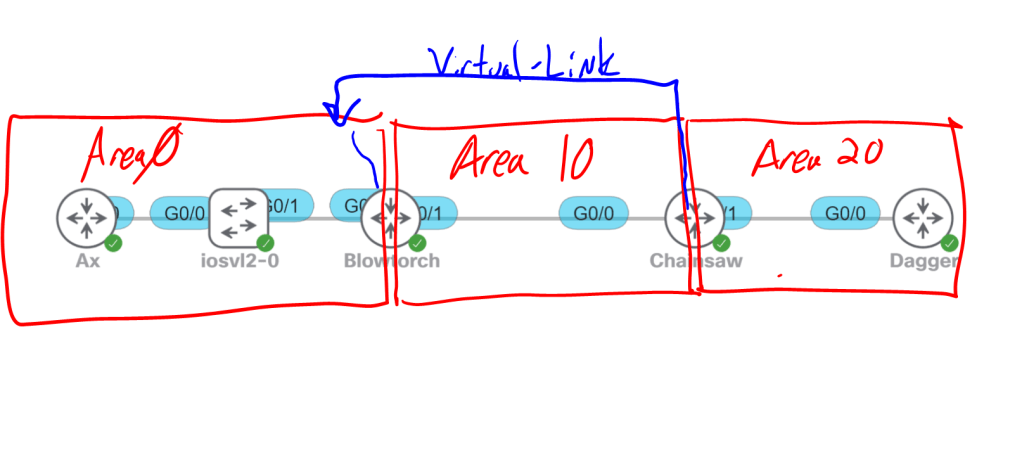
To be an ABR, you have to have a link in AREA 0. That means Chainsaw, pictured above can’t be an ABR unless we set up a virtual link.
- Virtual Links always exist in Area 0, meaning you can’t have a virtual link connecting area 20 to area 10. Your virtual link connects area 20 to area 0.
- The routers that have the Virtual Link between them have to be in the same area. So we can’t have a Virtual Link between Dagger and Blowtorch.
- You always use the router-id, not the interface IP address to create the Virtual Link. Since both routers are in the same area they know how to find each other by router-id.
Blowtorch
conf t
router ospf 1
router-id 0.0.0.2
area 10 virtual-link 0.0.0.3
Chainsaw
conf t
router ospf 1
router-id 0.0.0.3
area 10 vitual-link 0.0.0.2
Logically speaking, Chainsaw now has three different area connections, Gig0/0 in Area 10, Gig0/1 in Area 20, and a Virtual Link to Area 0.
1.4.e iv Stub router
I already covered these two topics in the previous section when I went on and on and on about Stub areas. I might move them under here later to make it easier to find them.
1.4.e v Loop-free alternate
Basically a backup-route. Sounds like someone is stealing ideas from EIGRP.
First we’ll enable it and say we want all prefixes to have the same protection eligibility using the low keyword.
R1
router ospf 1
fast-reroute per-prefix enable prefix-priority low
Or we can decide which specific prefixes are high priority and only enable protection for them.
R1
ip prefix-list PL_OSPF_LFA seq 10 permit 192.168.150.0/24
route-map RM_OSPF_LFA permit 10
match ip address prefix-list PL_OSPF_LFA
router ospf 1
prefix-priority high route-map RM_OSPF_LFA
fast-reroute per-prefix enable prefix-priority high
1.4.e vi Prefix suppression
The idea here is to save CPU cycles and save space in the routing table by suppressing the transit links within an area from showing up everywhere. There’s a link between R1 and R2, with prefix suppression we’re saying that R3 doesn’t need to know the details of that link. He only needs to know about the 10.1.1.0/24 host network that sits behind R1.
Honestly, I think the whole thing is dangerous and pointless in today’s networks. I want to be able to just directly ping R1 from R3 and see the routes in my routing table. But what do I know…
Globally:
R1
router ospf 1
prefix-suppression
Interface specific:
R1
interface gig 0/0
ip ospf prefix-suppression
 Oscorp Labs