
Some trivia facts:
- BGP runs on TCP port 179. The neighbor statement does the following:
- Listen for remote address on TCP 179
- Initiate a session to remote address on TCP 179.
- If there’s a collision, the higher router-id becomes the TCP client. The lower router-id becomes the TCP server.
- If the TCP server doesn’t expect the session it will refuse the connection.
- You can see this in Wireshark:
TCP 179 to the peer ->
<- TCP reset from the peer [RST, ACK] - You can view this with:
show control-plane host open-ports
- You can see this in Wireshark:
- The client packet is sourced from the outgoing interface in the routing table.
- You can manipulate this with the update-source command.
- If the TCP server doesn’t expect the session it will refuse the connection.
- BGP is a Path Vector protocol.
- BGP sees the route as a path through a series of autonomous systems (AS), rather than as router hops.
- The AS_PATH attribute is used to determine the best path based on fewest AS numbers.
- If the AS is different between the two peers, then it’s eBGP. If they’re in the same AS, it’s iBGP.
Basic eBGP configuration:
R1:
router bgp 1
neighbor 1.1.12.2 remote-as 2
network 1.1.12.0 mask 255.255.255.0
network 10.1.1.1 mask 255.255.255.255
R2
router bgp 2
neighbor 1.1.12.1 remote-as 1
network 1.1.12.0 mask 255.255.255.0
network 10.1.1.2 mask 255.255.255.255

Basic iBGP configuration:
R1:
router bgp 1
neighbor 1.1.12.2 remote-as 1
network 1.1.12.0 mask 255.255.255.0
network 10.1.1.1 mask 255.255.255.255
R2:
router bgp 1
neighbor 1.1.12.1 remote-as 1
network 1.1.12.0 mask 255.255.255.0
network 10.1.1.2 mask 255.255.255.255
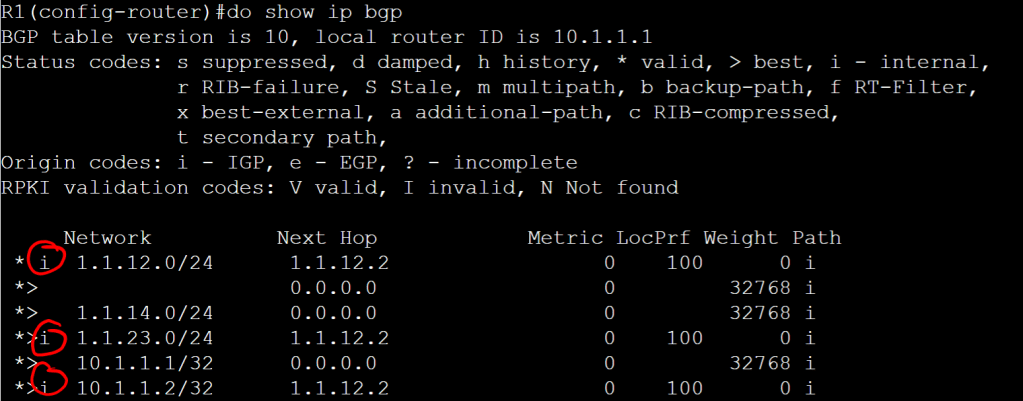
As shown above, the i shows it is internal.
BGP Sessions
- After adding the neighbor IP and AS number, BGP attempts to open a session on TCP 179.
- Routers verify the peer’s sender IP address against its own list of configured neighbors.
- If a BGP session comes in from an unknown peer IP, BGP drops it and does not establish the connection.
- The Router-ID is included with the session information.
- If both routers are trying to set up the BGP session at the same time, the higher-router ID wins. The other session is dropped.
- Router-ID is the numerically highest IP of any loopback, then interface that is up at the time of the start of the process.
- You can (and should) manually enter the Router-ID.
- The Router-ID is also used to ensure that the router doesn’t peer with itself.
- In the show ip bgp summary command, IDLE means the session establishment is not currently happening.
- Use debug commands to view the session states:
- debug ip tcp transactions
- debug ip bgp
- debug ip bgp events
- When the first attempts to open a session, it moves from IDLE to ACTIVE.
- The session moves from IDLE to CONNECT once the communications swap with the neighbor.
- CONNECT goes to OPENSENT while waiting for the neighbor to respond. The Open Message Contents are:
- BGP Version Number
- AS number of the local router
- Hold Time (dead timer)
- Routers agree on the lower value if the Hold Times aren’t the same.
- Setting it to zero (0) means it never expires, keepalives are not sent.
- BGP Router-ID
- Optional parameters, such as session authentication.
- When the local router receives an OPENSENT from the peer, the state goes to OPENCONFIRM, meaning the router sent a confirmation back to the peer.
- Once everything checks out, the state goes from OPENCONFIRM to ESTABLISHED.
BGP Keepalives
They’re a 1:3 ratio. So 60 second keepalives with 180 seconds hold time (this is the default). If the peer relationship goes down, everything goes down. This means the whole process starts from scratch, the peering starts over, all routes must be learned again. This could be bad if there are a bazillion routes.
Why does BGP need a keep alive mechanism, you ask? Standard BGP communication is done with TCP, which doesn’t have any way of knowing if the neighbor is still there. And since BGP only sends updates when required it could potentially be very quiet for a long time.
The keep alive value isn’t sent, just the hold time. So keep alive must be determined by one of the following:
- Locally configured keep alive.
- Received hold time divided by 3.
So if I configure my keep alive for 10 seconds, but then I receive a hold time of 18 seconds, I’ll set the keep alive to 6 seconds.
 Oscorp Labs